


When Andrej Karpathy coined “vibe coding”, he captured a shift that was already underway: developers stopped typing most of the code and started describing it. In this new workflow, the prompt is the source code, and the quality of the output is bounded by the quality of the input. Teams that master prompt craft ship in days what used to take weeks. Teams that don't spend those same days fighting hallucinated APIs and broken builds.
The gap is not about having access to a smarter model. The global AI coding market is projected to exceed $27 billion by 2032, and nearly every team already has a seat at one of these tools. What separates a good vibe coding session from a painful one is the prompt discipline you bring to it.
This guide distills the most effective prompt techniques we see working in 2026. You'll get a memorable framework (CLEAR), eight specific techniques, two copy-paste example prompts, anti-patterns to avoid, and tool-specific tips for Cursor, Bolt.new, Replit, Windsurf, and Emergent. Apply even half of them, and your first-pass code quality will climb sharply.
What Is Vibe Coding (and Why Prompts Matter)
Vibe coding is a way of building software where you describe the goal, behavior, and feel of what you want in natural language, and an AI agent handles the implementation. You focus on the what and the why; the model handles the how. The workflow is conversational — you prompt, inspect the result, and refine.
That's precisely why prompts matter more than they did in traditional coding. Every assumption you leave unstated becomes a guess the model will make for you. A vague prompt invites the model to default to generic boilerplate that ignores your stack, your conventions, and your business rules. A precise prompt anchors the output to your reality.
Prompt discipline also compounds. Research on AI-assisted development from GitHub's Copilot study showed productivity gains of up to 55% when developers gave the assistant structured intent rather than ad-hoc requests. The same principle scales to full-app builders: the better your first prompt, the fewer iterations you need, and the less context rot you accumulate.
The CLEAR Framework for Vibe Coding Prompts
Before you write another prompt, adopt a structure. CLEAR is a five-part mental checklist that fits on a sticky note and elevates almost any vibe coding instruction.
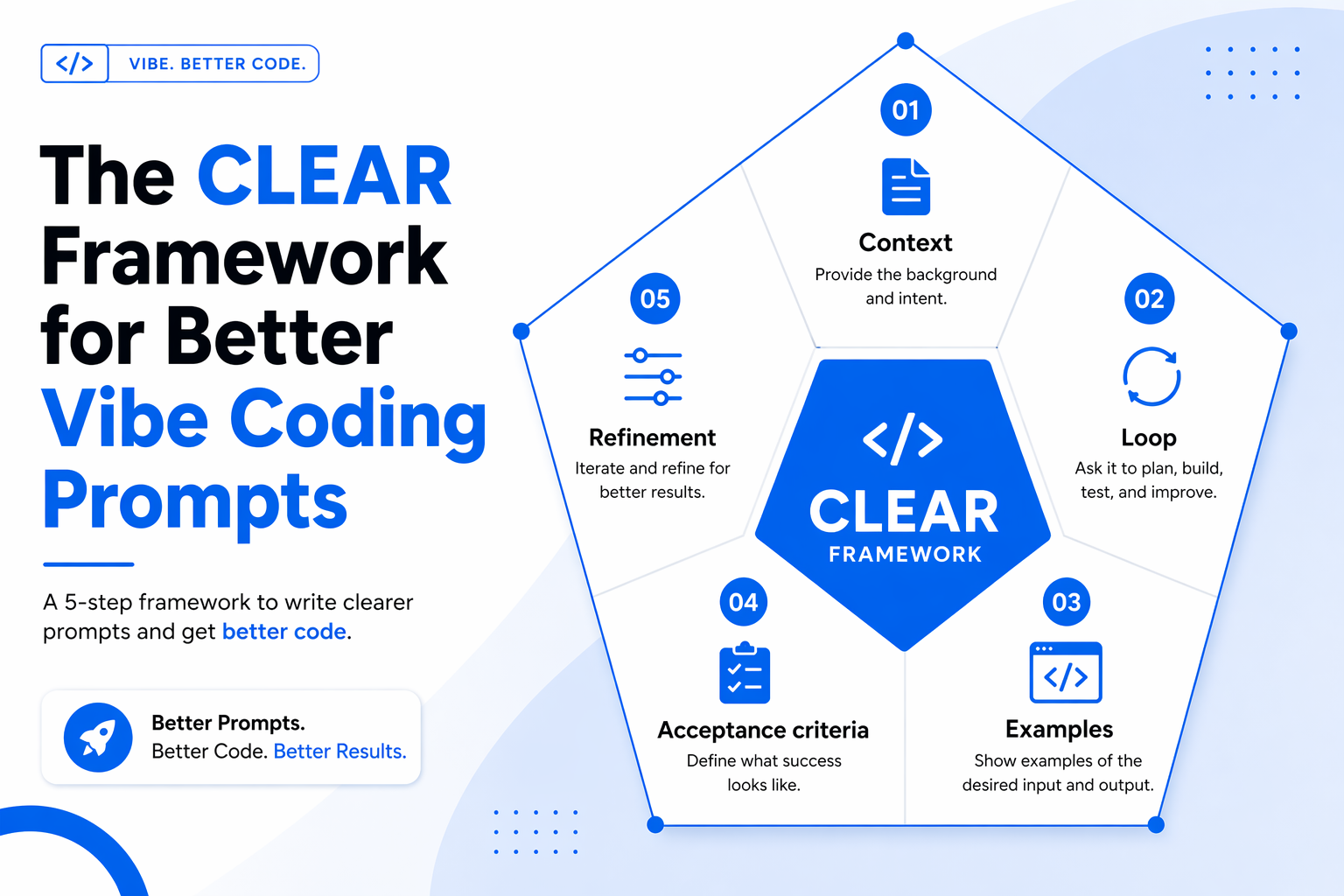
- C — Context: State the tech stack, files, architecture, conventions, and any business rules that constrain the solution. Without context, the model defaults to generic patterns that may ignore your framework choices.
- L — Loop: Plan for iteration from the start. Vibe coding is a conversation, not a one-shot command. Start with scaffolding, then layer functionality.
- E — Examples: Provide concrete inputs, expected outputs, and visual references where applicable. Examples are worth 100 adjectives.
- A — Acceptance criteria: Declare what “done” looks like — edge cases, error states, performance targets, and the tests you expect the output to pass.
- R — Refinement: Make surgical follow-ups. Change one thing at a time. Big rewrites invite regressions.
Treat CLEAR as a minimum viable checklist. If a prompt skips one of these five, it's likely underspecified.
8 Best Vibe Coding Prompt Techniques
The techniques below operationalize CLEAR. Use them together — they reinforce each other.
1. Lead With a Single, Specific Objective
Open the prompt with one sentence that states exactly what you want to build. This anchors the model and prevents it from inferring a different goal from ambiguous details. Avoid stacking multiple aims in a single opener; if you need two systems, write two prompts.
2. Frame Features as User Actions, Not Implementation
Describe what a user should be able to do, not how the code should be structured. “A visitor can sign up with email and see a personalized dashboard,” beats “build a React component with a useState hook and a useEffect.” Behavior framing lets the model choose idiomatic patterns for your stack.
3. Layer Context Explicitly
Stack every relevant piece of background into the prompt: framework, language, style conventions, existing files, API contracts, and known constraints. Context layering is the single biggest quality lever in vibe coding. Without it, the assistant falls back on generic boilerplate that ignores your repository.
4. Use Bullet-Structured Specs
When a feature has multiple parts, use short, numbered bullets. Lists are easier for the model to parse than dense paragraphs and are less likely to drop a requirement. One bullet equals one testable behavior.
5. Include Concrete Examples and References
Show sample inputs and outputs, attach a design reference, or name a product whose feel you want. “Onboarding like Linear” conveys more than a paragraph of aesthetic adjectives. Examples also reduce the ambiguity surface that causes hallucinated APIs and wrong data shapes.
6. Declare Integrations, Auth, and Data Model Up Front
Mention third-party services, authentication strategies, and the core data model in the first prompt. Integrations introduced later force structural rewrites. If you know you'll use Stripe, Supabase auth, or Postgres, say so at the start.
7. Define Acceptance Criteria and Edge Cases
State what “done” means. Include error states, empty states, validation rules, and performance constraints. Asking the model to also generate tests around those criteria makes the spec self-verifying and shortens the debugging loop.
8. Iterate in Small, Surgical Prompts
The first result is rarely perfect, and that's fine. Vibe coding is a dialogue. Follow up with single-intent changes: “Make the CTA button full-width on mobile” is better than a paragraph of revisions. Small edits are easier to review and easier to roll back.
Technique Comparison at a Glance
Example Prompts in Practice
Seeing the framework applied makes it stick. Here are two end-to-end prompts that follow CLEAR and use several of the techniques above.
Example 1: A Minimal Task-Management Homepage
The goal here is a marketing homepage for a task-management SaaS with a clear hero, feature trio, pricing table, and contact form. Context is explicit (Next.js 15, Tailwind), the data model stays out of scope, and the acceptance criteria cover responsiveness and accessibility.
Build a single-page marketing site for a task-management SaaS called FlowList using Next.js 15 (App Router) and Tailwind CSS. Sections, in order: (1) Hero with headline, sub-headline, and a primary CTA to /signup; (2) three feature cards with Lucide icons covering Capture, Prioritize, and Review; (3) a pricing section with Free, Pro ($9), and Team ($29) columns and a comparison table; (4) a contact form with name, email, and message fields that POSTs to /api/contact. Use a light theme with a single accent color (#006AEA). Acceptance: fully responsive from 360px up, AA-contrast text, keyboard-navigable forms, Lighthouse accessibility ≥ 95. No external UI libraries beyond Tailwind and Lucide.Example 2: A Real-Time Analytics Dashboard
This prompt is for a dashboard fed by a WebSocket stream. Notice how integrations are called out first, examples are used for the data shape, and acceptance criteria include empty and error states.
Build a real-time analytics dashboard in React + TypeScript with Recharts. Data arrives on a WebSocket at /ws/events as JSON events of shape { ts: ISOString, userId: string, event: 'pageview' | 'signup' | 'purchase', value?: number }. The dashboard has: (1) a top summary row showing live counts for today; (2) a line chart of events-per-minute over the last 60 minutes; (3) a recent-events table with pagination (20 rows per page); (4) a dropdown filter for event type. Acceptance: handle disconnects with auto-reconnect and a visible 'Reconnecting…' banner; show an empty state when no events have arrived; no memory leaks after 30 minutes; unit tests for the reducer that aggregates events.Prompt Anti-Patterns to Avoid
Most bad vibe coding output can be traced to a handful of recognizable prompt smells. Watch for these:
- Vague goals: “Make it better” gives the model nowhere to aim. Restate the objective with a measurable outcome.
- Kitchen-sink prompts: Mixing auth, UI, payments, and analytics in one instruction forces the model to compromise on all four. Split the work.
- Missing acceptance criteria: Without a definition of done, every output is plausibly correct. Write the tests into the prompt.
- Unbounded context: Dumping the entire repo into the window dilutes attention. Point at the specific files that matter.
- Re-prompting instead of editing: Starting a fresh thread loses the working state. Refine the last prompt in place.
- No diff review: Accepting large patches without reading them is how security bugs and dead code accumulate.
The last point matters more than it sounds. Stanford research on AI-assisted code found that developers using AI assistants without review produced notably less secure code than unaided peers — not because the model is adversarial, but because unreviewed suggestions drift toward plausible-but-wrong patterns.
Tool-Specific Tips
The techniques are universal, but each vibe coding tool rewards slightly different prompt shapes.
- Cursor: Reference specific files and symbols with @-mentions. Cursor's strength is precise file scope — use it.
- Bolt.new: Visual-first. Lean into layout cues and design references; it renders and iterates quickly.
- Replit: Great for scaffolds and full-stack apps. Declare the runtime and data layer up front so the sandbox is configured correctly.
- Windsurf: Its auto-discovered context is powerful, so keep your stated goal tight to avoid competing signals.
- Emergent: Rewards structured, spec-style prompts — CLEAR is almost a direct fit for its workflow.
Conclusion
The best vibe coding prompt techniques share a pattern: they replace vibes with structure. State the objective, layer the context, show concrete examples, declare what “done” means, and iterate in small, reversible steps. Teams that internalize the CLEAR framework stop fighting their AI tools and start compounding gains from them.
Apply CLEAR on one real project this week — even a 30-minute prototype. For organizations scaling AI-native engineering capacity, Crewscale helps build vetted, agent-ready engineering teams that turn prompt discipline into shipped products. The next few years belong to teams that prompt precisely.


