

For most indie founders, the launch video has quietly become the bottleneck. Your product is shipped, your landing page is live, and then the calendar-blocking question lands: Do we really need a motion studio for this? The old answer was painful — storyboards, agency cycles, four-figure invoices, and weeks of revisions for something most viewers will watch for fifteen seconds.
Vibe code videos in Replit rewrite that equation. Inside the same workspace where builders prototype apps, Replit Animation now lets them generate motion-style launch videos from natural-language prompts, often producing a first cut in under thirty minutes. One member of Replit's design team used an early version of the tool to ship a launch clip that later earned over a million organic impressions, which became the internal proof point for a wider rollout.
This article explains what Replit Animation actually is, how the vibe coding workflow translates to motion graphics, how to prompt it effectively, and where it fits in a modern launch stack — so the next launch video can ship the same afternoon the idea shows up.
What Vibe Code Videos Actually Mean
The phrase borrows from a broader shift in software. In vibe coding, a developer describes an intended outcome in natural language and lets a large language model translate that intent into working code. Applied to motion graphics, the same pattern produces a scene-by-scene sequence from a single paragraph of plain English describing the launch, the audience, and the vibe.
What Replit Animation Is
Replit Animation is a motion graphics studio built directly into the Replit workspace. The Replit Agent detects video-style prompts, loads the Animated Video stack, and generates programmatic, React-based scenes that render server-side. Because the output is code-generated rather than pixel-predicted, text stays crisp, colors stay consistent, and edits apply deterministically across every scene.
What It Is Not
- It is not a diffusion-model video generator like Sora or Veo that hallucinates frames from pixels.
- It is not a replacement for live-action footage, customer interviews, or hand-drawn animation.
- It is not a template library — every output is generated fresh from the prompt.
Replit Animation vs AI Video Generators
Why It Matters for Builders
The appeal is structural, not cosmetic. A workflow that used to require outside collaborators now runs inside the same tab where the product lives, which changes what a solo builder can reasonably ship.

- Time Compression: A multi-week agency cycle collapses into a single working session.
- Cost Compression: Launch videos that used to require four-figure quotes are produced within a tier that is available on the Replit free plan.
- Creative Control: No back-and-forth with a designer who has never used the product.
- Continuity: The workspace that ships the app now ships the launch asset, so updates stay in sync.
- Iteration Speed: Scene changes happen at the pace of a chat message.
How It Works Under the Hood
A single prompt flows through three stages. First, the Replit Agent parses the request and loads the Animated Video stack automatically. Next, a prompt optimizer expands the idea into a scene-by-scene outline with visual direction and motion styling. Finally, a React-based rendering pipeline produces the frames server-side, so the workspace stays responsive while the clip compiles.
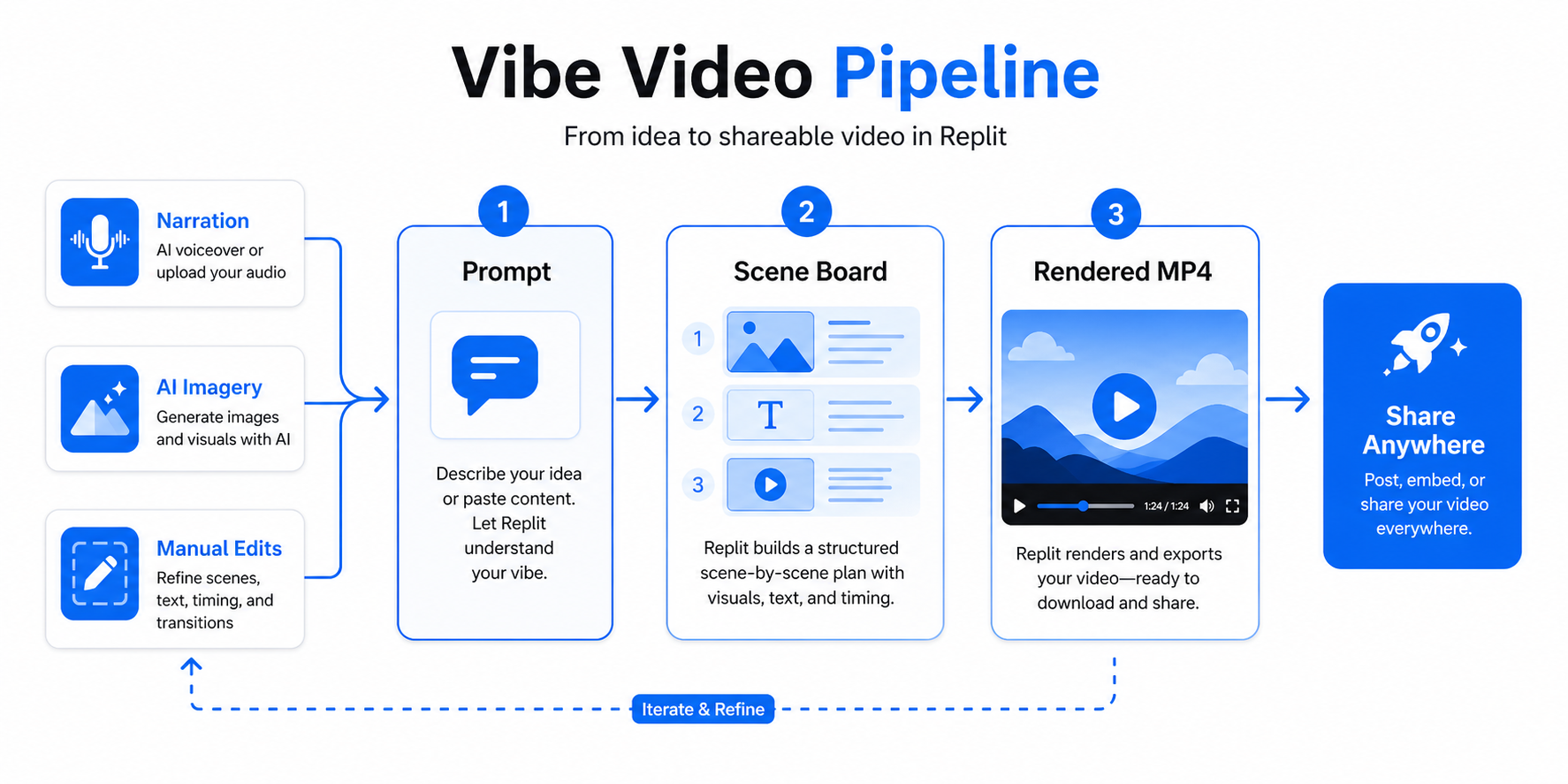
Scene generation draws on frontier reasoning models to plan pacing, copy, and visual hierarchy. The final output exports as MP4 up to 1080p at 30 or 60fps, which slots directly into landing pages, Product Hunt submissions, and social posts without additional conversion.
Step-By-Step: Ship a Launch Video Today
- Open Replit, stay on the App tab, and describe the video you want in plain English. The Agent will detect a video-style prompt and route the request to the Animated Video stack.
- Gather three to five assets — product logo, hero screenshots, brand colors, and any reference frames. Upload them into the workspace before prompting.
- Write a structured first prompt. Useful template: "Create a 30-second launch video for [product] aimed at [audience]. Vibe: [two adjectives]. Scenes: [beat 1, beat 2, beat 3]. End on: [CTA]."
- Run the built-in Enhance Prompt optimizer to convert the paragraph into a scene-by-scene outline with visual direction.
- Open two or three alternate prompts in separate tabs and compare outputs — cherry-pick the strongest scenes rather than regenerating the whole clip.
- Edit surgically. Request specific changes, such as "make scene two slower and switch the palette to deep blue" instead of asking for broad improvements.
- Layer in narration and AI-generated supporting footage where needed, then preview the full sequence.
- Export as MP4 and publish the clip directly from the workspace or drop it into the launch surfaces where it belongs.
Prompting Tips That Actually Move the Needle
Strong results come less from writing one perfect opening prompt and more from structured iteration. A useful mental model is Purpose → Audience → Vibe → Pacing → Beats (PAVPB), which mirrors how motion directors brief a studio.
- Name references explicitly. Phrases like "Apple keynote pacing" or "Linear-style minimalism" give the agent a strong aesthetic anchor.
- Use real motion vocabulary. Transitions such as spring, slide, bounce, shimmer, text reveal, and logo reveal consistently separate rough drafts from polished clips.
- Iterate surgically. "Change the color of scene three to midnight blue" performs better than "make it feel cooler."
- Always request a strong closing frame. Name the CTA copy, the logo placement, and the final transition.
- Run variants in parallel. Two or three tabs with slightly different prompts beats sequential rerolls.
Where It Fits (and Where It Does Not)
The tool is purpose-built for motion-heavy launch surfaces. It is not a universal video solution.
Strong Fit For:
- Product launch and feature announcement videos.
- Hero animations for landing pages and Product Hunt posts.
- Social clips for X, LinkedIn, and Instagram Reels.
- Pitch-deck openers and investor update videos.
Reach For Something Else If:
- Live-action customer testimonials or founder pieces.
- Long-form tutorials that require real screen capture.
- Highly bespoke hand-drawn animation styles.
The broader context matters too. Natural-language programming is moving from code into every adjacent creative surface, and motion graphics is one of the first places the shift is visible inside a mainstream builder tool.
Conclusion
Replit Animation collapses a workflow that used to involve storyboards, motion studios, and multi-week revision loops into a single chat-driven session inside the workspace where the product already lives. The launch video is no longer the bottleneck. The prompt is. Open the Animation build type this week, write a structured first prompt, and ship the clip you have been postponing.
Teams that want to pair this velocity with senior engineering muscle can lean on Crewscale, which connects fast-moving founders with vetted operators who help turn vibe-coded prototypes into production-grade launches. The best launch videos of the next cycle will not come from the biggest studios. They will come from builders who can describe what they want and hit render.


